How to Find the Best Keywords to Trend Your YouTube Video in 2026?
Let me be honest with you — I spent months uploading YouTube videos that barely broke 200 views. Great content, terrible keyword strategy. The moment I started treating YouTube like the search engine it actually is, everything changed.
If you're serious about growing your channel in 2026, keyword research isn't optional. It's the difference between a video that trends and one that quietly collects dust.
Why YouTube Keywords Are More Important Than Ever
YouTube processes over 3 billion searches every single month. It's the world's second-largest search engine — bigger than Bing, Yahoo, and every other platform combined. And just like Google, it lives and dies on keywords.
Here's what the right keywords actually do for your channel:
- Boost your search rankings — Videos with well-placed keywords in titles, descriptions, and tags consistently rank higher in YouTube search results.
- Trigger the recommendation algorithm — YouTube's algorithm matches video metadata to viewer search intent and watch history. Better keywords = better recommendations = more organic reach.
- Pull in new subscribers — People searching for specific topics are already interested. You're not convincing strangers; you're meeting an audience halfway.
- Increase ad revenue — More impressions and views directly translate to higher CPM and better monetization opportunities for creators.
The bottom line? You can make the best video in your niche and still fail if nobody can find it. Keywords are how people find you.
Step-by-Step: How to Find the Best YouTube Keywords in 2026
1. Start With YouTube's Own Autocomplete
This one is free, instant, and wildly underused.
Open YouTube, type your topic into the search bar, and don't hit enter. Watch what pops up. Those autocomplete suggestions aren't random — they're pulled from real searches by real people, ranked by popularity.
For example, type "budget smartphone" and you might see:
- budget smartphone India 2026
- budget smartphone under 15000 5G
- budget smartphone review Hindi
Every single one of those is a keyword idea. Screenshot them, write them down, and start building a list.
Pro tip: Try the same search with different starting words — "best budget," "top budget," "cheap budget" — and you'll unlock dozens more variations.
2. Use a Free Keyword Research Tool
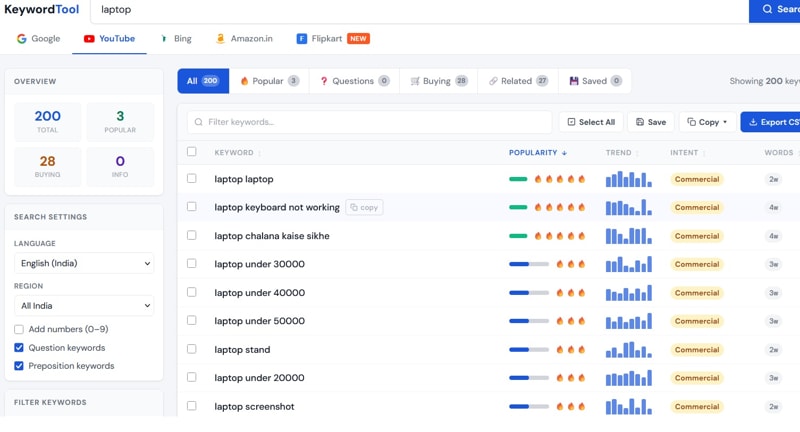
Autocomplete gives you starting points, but dedicated tools give you the full picture — search volume, competition level, related keywords, and trending queries all in one place.
Valsolution's Free Keyword Tool is one of the most practical options available right now. It pulls real search query data directly from YouTube and Google, making it easy to:
- Discover high-volume, low-competition YouTube keywords
- Compare search trends across both YouTube and Google simultaneously
- Find long-tail keyword variations you'd never think of manually
- Identify seasonal spikes and rising keyword trends
The Valsolution Amazon Keyword Tool Extension is also worth grabbing if your content touches product reviews, tech, or consumer goods — it pulls cross-platform keyword data that gives you a competitive edge most creators ignore.
For anyone doing YouTube SEO seriously, having a reliable free YouTube keyword research tool in your workflow isn't a luxury. It's a necessity.
3. Spy on Your Competitors (Legally and Smartly)
Find the top 5–10 videos in your niche — the ones ranking on page one for your target topic — and study them like a textbook.
Look at:
- Their titles — What exact phrases are they using? How do they structure their headlines?
- Their descriptions — What keywords appear in the first two or three lines?
- Their tags — Some creators leave their tags visible. Right-click on any YouTube page, hit "View Page Source," and search for
"keywords"to find a video's tags.
You're not copying anyone. You're reverse-engineering what's already proven to work, then doing it better with your own original content.
4. Prioritize Long-Tail Keywords
New creators make the same mistake constantly: they target huge, vague keywords and wonder why they can't rank.
"Music video" has tens of millions of competing results. You will not beat established channels on that term. But "best romantic Hindi music video 2026 new"? That's a keyword with real search intent, far less competition, and an audience that knows exactly what they want.
Long-tail keywords (3–5+ words) are your fastest path to ranking, especially when your channel is still growing. They drive targeted traffic, improve watch time because viewers get exactly what they searched for, and give the algorithm strong signals about your content.
Some strong long-tail keyword examples to model:
- best free YouTube keyword research tool for beginners
- how to rank YouTube videos fast in 2026
- YouTube SEO tips for small channels
- keyword strategy for trending YouTube videos
5. Validate With Google Trends
Before you commit to a keyword, check whether it's actually trending upward or slowly dying.
Google Trends is free and takes 30 seconds to use. Type in your keyword, filter to YouTube Search (not just web), and look at the trajectory over the past 12 months. A keyword with rising interest is worth targeting. One that peaked two years ago might not be worth your effort.
For 2026, some consistently high-performing keyword categories on YouTube include:
- AI tools and tutorials (AI video editing tutorial, best AI tools for creators)
- Personal finance content (how to save money in 2026, best investment apps India)
- Short-form content strategy (how to go viral on YouTube Shorts)
- Budget tech reviews (best 5G phone under 15000 India)
6. Place Keywords Where They Actually Count
Finding keywords is only half the job. Where you put them determines whether YouTube's algorithm actually picks them up.
Here's your keyword placement checklist for every video:
| Location | Best Practice |
|---|---|
| Video Title | Lead with the primary keyword; keep it under 60 characters |
| Description (First 2–3 Lines) | Include main keyword naturally; this text appears in search results |
| Description (Full Body) | Add secondary keywords, related phrases, and context |
| Tags | Use a mix of exact-match and broad keyword variations |
| Captions & Transcripts | YouTube reads these — auto-captions help, but custom ones are better |
| File Name Before Upload | Rename your video file to match your primary keyword |
| Chapter Titles | If using timestamps, include keywords in chapter names |
The golden rule: Write for humans first, algorithm second. Keyword-stuffed titles that sound robotic actively hurt your click-through rate. Natural, compelling, and keyword-rich is the sweet spot.
Real Example: Putting It All Together
Let's say you're uploading a video reviewing budget smartphones in India.
Step 1 — Autocomplete research yields:
- "best budget smartphone India 2026"
- "best 5G phone under 15000"
- "cheap smartphone with good camera India"
Step 2 — Keyword tool research adds:
- "best free Amazon keyword research tool for smartphone reviews"
- "top budget Android phones 2026 India"
Step 3 — Long-tail focus:
- Primary keyword: best budget smartphone India 2026
- Secondary keyword: cheap 5G phone under 15000
Step 4 — Optimized title:
Best Budget Smartphones in India 2026 | Top 5 Cheap 5G Phones Under ₹15,000
Step 5 — Description opening:
"Looking for the best budget smartphone in India 2026? In this video, I review the top 5 cheap 5G phones under ₹15,000 — covering camera quality, battery life, and performance. These are the best value smartphones you can buy right now..."
That's a complete, optimised keyword strategy built from scratch in under 20 minutes.
Final Thoughts
There's no shortcut to building a YouTube channel — but there is a smarter way to work. Every hour you spend on keyword research multiplies the reach of every video you make. Skip it, and even your best content struggles to find its audience.
Start with autocomplete. Use a solid free keyword tool like Valsolution's YouTube Keyword Tool. Study what's already ranking. Go long-tail. And always, always write for your viewer first.
Do that consistently, and your videos won't just get found — they'll trend.
Related Keywords Naturally Covered in This Post: YouTube keyword research 2026 · how to rank YouTube videos · best YouTube SEO strategy · free YouTube keyword tool · long-tail keywords for YouTube · YouTube search algorithm · how to trend on YouTube · keyword research for beginners · Valsolution keyword tool · YouTube video optimization tips · YouTube tags strategy · how to find trending keywords · YouTube SEO guide · keyword placement YouTube · best free keyword research tool
Found this helpful? Share it with a fellow creator who's still guessing at keywords.
Comments
Share a useful thought or ask a question about this article.
Leave a comment