How to Test Live Streams Online with HLS Stream Tester?
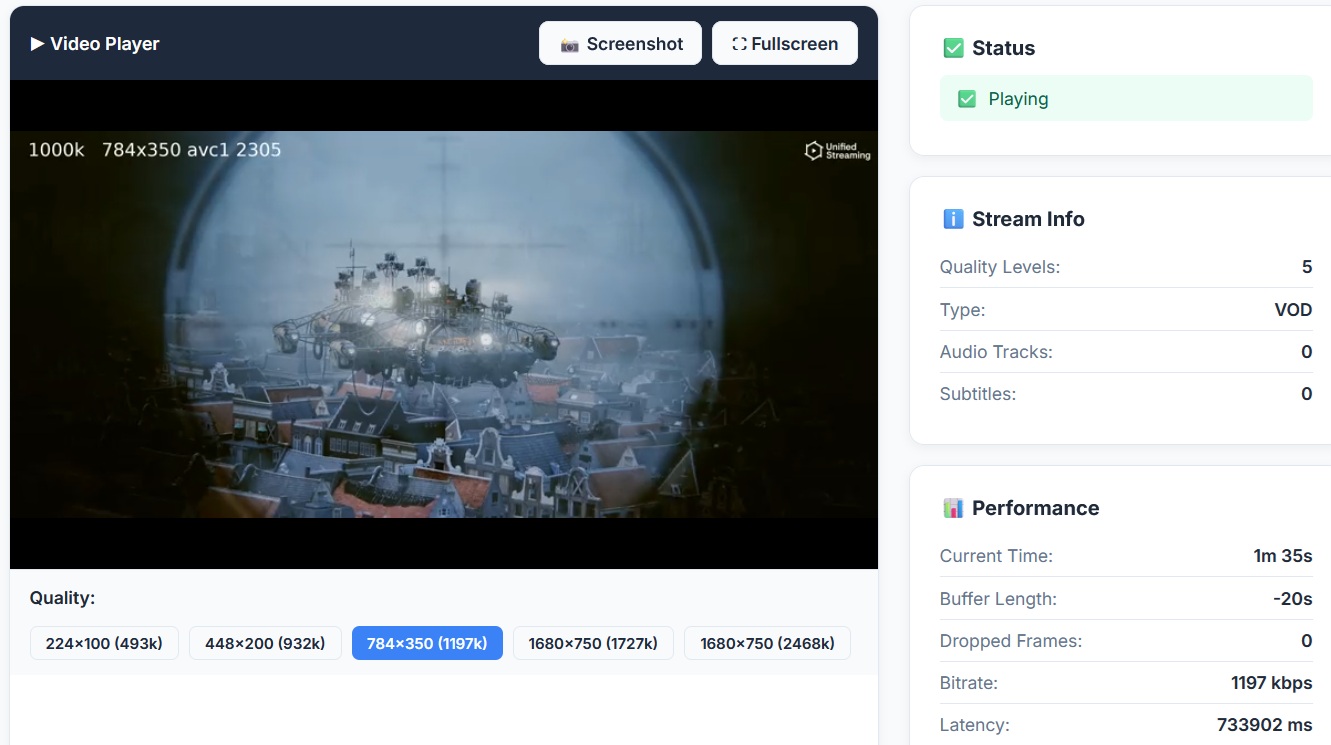
Live streaming is now used everywhere — OTT platforms, online TV channels, sports broadcasts, webinars, live events, education, and business meetings. But before sharing any live stream link with viewers, it is very important to check whether the stream is working properly or not. This tool will be helpful for those who want to check online hls stream is working or not.
A broken HLS link, buffering issue, unsupported format, or playback error can create a bad experience for users. This is why an online HLS Stream Tester is useful for broadcasters, developers, OTT providers, website owners, and content creators.
With Valsolution’s Free Live Stream Tester, you can quickly test your HLS or M3U8 stream URL directly in your browser. Just paste your stream link, click the test button, and check whether your live video is playing smoothly.
What Is an HLS Stream Tester?
An HLS Stream Tester is an online tool that helps you play and check HLS streaming links. HLS usually uses M3U8 playlist URLs, which are commonly used for live TV, OTT apps, web players, and mobile streaming.
Instead of waiting until your viewers report a problem, you can test the stream yourself before publishing it. This helps you confirm whether your HLS URL is active, playable, and stable.
Why Should You Test Your Live Stream?
Testing your live stream before going live can save you from many common streaming problems. It helps you:
- Check whether your HLS M3U8 URL is working.
- Find playback errors before viewers notice them.
- Detect buffering or loading issues.
- Confirm video and audio playback.
- Check stream stability in the browser.
- Review basic stream performance and event logs.
- Avoid downtime during important live events.
For OTT platforms, IPTV services, live TV websites, and app developers, stream testing is not optional. It is a basic quality check before sharing the stream with users.
How to Test a Live Stream Online
Valsolution makes live stream testing simple. You do not need coding knowledge or any heavy software. Follow these simple steps:
Step 1: Enter Your Stream URL
Copy your HLS stream link and paste it into the stream tester box. Most HLS links end with M3U8.
Example URL:
https://example.com/live/playlist.m3u8
Step 2: Click on Test Stream
After entering the URL, click the Test Stream button. The tool will try to load your stream in the built-in video player.
Step 3: Watch the Playback
If the stream is working, the video will start playing in the player. You can check whether the stream loads quickly, plays smoothly, and does not stop again and again.
Step 4: Check Stream Status
The status panel helps you understand the current condition of the stream. It can help you identify whether the stream is loading, playing, stopped, or showing an error.
Step 5: Review Event Logs
The event log gives useful technical details about the stream. If there is any playback issue, loading error, or player event, you can check it here.
This is helpful for developers, streaming service providers, and website owners who want to debug live stream problems.
Step 6: Analyze Stream Performance
You can also review stream quality, playback stability, and performance behavior. This helps you understand whether your stream is ready for users or needs improvement.
Key Features of Valsolution Live Stream Tester
Free Online HLS Stream Testing
Valsolution’s tool is browser-based, so you do not need to install any software. You can test your HLS stream online for free.
M3U8 Link Tester
If you have an M3U8 URL, you can paste it into the tester and quickly check whether it is playable.
Built-in Video Player
The tool includes a video player that loads your stream directly in the browser. This helps you check real playback instead of only checking whether the link exists.
Live Streaming Diagnostics
The diagnostics section helps you understand what is happening during playback. You can check stream status, events, and possible errors.
Event Log for Debugging
The event log is useful for finding stream-related issues. If a stream fails to play, developers can review the log and identify the possible reason.
Performance Dashboard
The performance dashboard helps you monitor stream quality and stability. This is useful before publishing your stream on a website, mobile app, or OTT platform.
Quick Test URLs
You can also try sample streams to understand how the tool works. Demo streams are helpful when you want to test the player before checking your own live stream URL.
Simple and User-Friendly Interface
No technical setup is required. Just paste the URL, click the button, and test the stream.
Who Can Use This Tool?
Valsolution Live Stream Tester is useful for:
- OTT platform owners
- IPTV service providers
- Website developers
- App developers
- Live TV channel operators
- Sports streaming providers
- Online event organizers
- Content creators
- Broadcasters
- Video player testers
If your work depends on HLS or M3U8 streaming links, this tool can help you test streams faster.
Common Problems You Can Detect
A live stream may fail for many reasons. With an HLS stream checker, you can identify issues like:
- Invalid M3U8 URL
- Stream not loading
- Video buffering
- Audio not playing
- CORS-related playback issue
- Unsupported codec
- Expired stream link
- Server downtime
- Slow segment loading
- Broken playlist or media segments
Testing the stream before publishing helps you fix these issues early.
Why Use Valsolution’s Online Live Stream Tester?
Valsolution’s Free Live Stream Tester is designed to make stream checking fast and simple. It is especially helpful when you want to validate a stream before adding it to a website, OTT app, IPTV player, or live event page.
You can use it as an HLS stream tester, M3U8 player online, live stream checker, online video playback tester, stream diagnostics tool, and free live stream quality analyzer.
Instead of guessing whether a link will work, you can test it directly and make a better decision.
Whether you are a broadcaster, developer, OTT provider, or content creator, this tool can help you deliver a smoother and more reliable live streaming experience.
FAQs -
What is an HLS stream?
HLS stands for HTTP Live Streaming. It is a popular streaming format used for live video and video-on-demand playback. HLS streams usually use M3U8 playlist links.
What is an M3U8 file?
An M3U8 file is a playlist file used in HLS streaming. It contains information about video segments and helps the video player load the stream.
How can I test an M3U8 link online?
You can test an M3U8 link by pasting the stream URL into Valsolution’s Live Stream Tester and clicking the test button. The tool will load the stream in the browser player.
Is Valsolution Live Stream Tester free?
Yes, Valsolution Live Stream Tester is a free browser-based tool for testing HLS and M3U8 stream URLs online.
Do I need to install any software?
No. You can test your stream directly in the browser. No installation or coding is required.
Why is my HLS stream not playing?
Your HLS stream may not play because of an invalid URL, server issue, CORS problem, unsupported codec, expired token, or broken media segments.
Can I use this tool for OTT app testing?
Yes. If your OTT app uses HLS or M3U8 stream URLs, you can test those links before adding them to your app or website.
Can I check live TV streams with this tool?
Yes, if the live TV stream uses a valid HLS M3U8 URL, you can test it with Valsolution Live Stream Tester.
Does this tool show stream errors?
Yes, the event log and status panel can help you understand playback events and possible stream errors.
Who should use an HLS stream tester?
Broadcasters, OTT providers, IPTV operators, app developers, web developers, and content creators can use an HLS stream tester to check stream playback and quality.
Comments
Share a useful thought or ask a question about this article.
Leave a comment